魔方小站
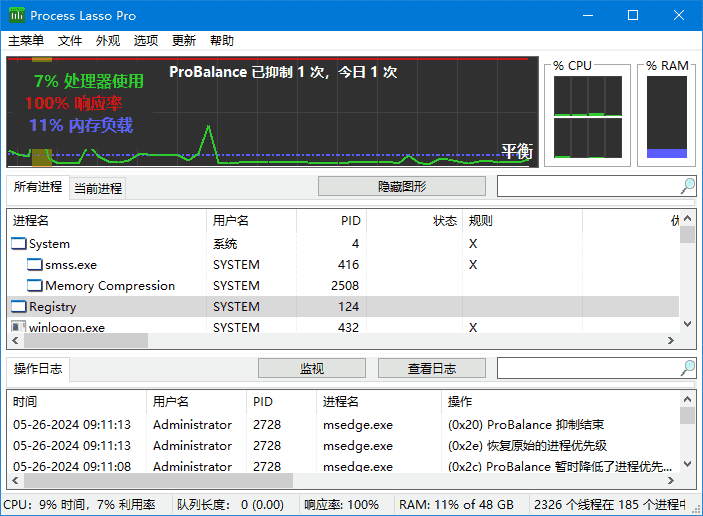
魔方小站Process Lasso是一款非常独特神奇的性能优化工具,其核心功能进程平衡器(ProBalance),通过对进程CPU及 I/O 负载监控,超标自动抑制,达到动态平衡系统负载,让你再也没有卡.卡…卡的感觉,适用于WinXP、Vista、Win7、Win8。Process Lasso 最牛的地方在于可以调整 IO 和 Thread 的优先级,而不仅仅是 CPU 的优先级,Process Lasso 是我目前所知道唯一的一个有这个能力的,Sysinternals 的 Process Explorer 也只能调整 CPU 的优先级而已。Process Tamer 等类似的软件多了去了。甚至于任务管理器手动都可以调整。运行卡顿,多数在于硬盘 IO 能力弱,比如你拷贝大量数据的时候,运行程序会相当慢。所以除了把 HDD 换成 SSD 以外,最靠谱的就是调整 IO 的优先级,比如把视频、音乐播放器,浏览器的 IO 优先级调整到最高。把文件复制之类的 IO 优先级降低,Process Lasso 可以实现。程序的 Probalance 的动态平衡,默认不会调整 IO 优先级,需要选项自己开启。
下载地址
进程优化工具 Process Lasso v18.2.0.50 多语便携版
- 夸克:https://pan.quark.cn/s/d6f6729f7f7b
- 百度:https://pan.baidu.com/s/1mMEthF9YREl9fAsYJt-STg?pwd=88in
- 迅雷:https://pan.xunlei.com/s/VOijpd9KxQG5PLDYl5G0UIsRA1?pwd=jq7x#
软件功能
- 1、ProBalance功能。翻译成中文是“进程平衡”。这个功能会自动调整进程的优先级,让系统运行更加流畅,响应时间更短。
- 2、游戏模式。当启用这个模式后,电脑会把更多的资源分配给游戏,会有什么益处也不用多说了。当然,事先你必须要在Process Lasso中找到游戏进程,并在右键菜单中选择“归类为游戏或多媒体进程”。
- 3、默认优先级。
- 4、默认CPU亲和力。
- 5、不允许的进程。也就是进程黑名单功能。如果有些软件总是未经允许就运行,那么这就是它的克星,只要把它的进程添加入黑名单,那它就不会运行,也不会给它耍流氓的机会。
- 6、默认I/O优先级。
- 7、ProBalance I/O抑制 (基于CPU配额)
- 8、能源节省。如果用的是笔记本,那么启用这个能够让笔记本电脑拥有更长的电池寿命。
- 9、前台加速。
关于激活
- 1、双击processlassosetup.exe安装软件不要勾选启动Process Lasso;
- 2、下载解压Process Lasso Pro Crack.rar,运行Activator.exe,下拉选择Process Lasso Pro点击Activate激活即可,点击Patch Hosts files会自动添加规则禁止程序联网检测注册信息。
Process Lasso Pro 18.1.0.44 Multilingual (2026/05/06)
https://dl.bitsum.com/files/processlassosetup64.exe
https://dl.bitsum.com/files/processlassosetup32.exe
更新日志
Process Lasso - Version History
https://bitsum.com/changes/processlasso/
v18.2.0.50 – May 22, 2026
Add load-based power profile switcher
Minor fixes and enhancements
(1) GUI: Add load-based power profile switcher feature
(11) GUI: Extend per-process multi-GPU readings to the Active Processes view
(11) GUI: When showing multiple GPUs on the line graph, have GPU widgets use GPU line colors
(13) GUI: Add GPU numbers to line graph legend when showing multiple
(13) GUI: Fix an issue with the Japanese RAM load status bar partition
(15) GUI: Improve rendering of widget captions with larger text sizes
(15) GUI: Fix an issue where multiple identical GPUs could sometimes get filtered out in dedupe
(15) GUI: Add diagnostic data collection tool to the Help menu and About box
(17) GUI: Fix an issue with the Finnish translation that would prevent the GUI from opening
(17) GUI: Improve CPU and GPU widget graph tooltip behavior
(17) GUI: Add tooltip to the RAM widget
(19) GUI: Create distinct strings for actions due to verb subject ordering differences between languages
(19) GUI: Have action (e.g. terminate) confirmation messagebox list the specific process(es)
(21) GUI: Improve tooling around translation validation
(21) GUI: Fix an issue with the sort of CPU average column
(23) GUI: Add HKCU registry settings to override GPU widget colors “gpuColor1”, “gpuColor2”, …
(23) GUI: Adjust GPU preference rule string characters
(25) GUI: Add custom color selection menu items for present GPU adapters
(27) GUI: After reset custom colors is used, don’t change the theme to custom
(29) GUI: Remove adapter name suffix from GPU preferences when it would be identical
(29) GUI: Improve behavior of GPU Preference adapter names on systems with same-class GPUs
(33) GUI: Dynamically size Show/Hide Graph and Edit Rules buttons
(41) GUI: Add View option to control per-process GPU data collection (auto, all, visible rows only)
(43) GUI: Adjust GPU utilization aggregate total methodology to handle some edge cases
(49) GUI: Dynamically size View Log and Insights buttons
(49) GUI: Improve button padding when system font size is increased
(49) GUI: Translation updates
_借鉴了pawel97破解方式















![[经济趋势]《消费繁荣与中国未来》| 提振消费的转型路径与机遇-魔方小站](https://www.4mf.icu/wp-content/uploads/2026/01/78805a221a988e7-741.png)